You open a PDF, check the date on it, and think "great, this proves when it was made." Not so fast. That little date sitting in your PDF's properties is easier to change than your phone's wallpaper. A real digital signature timestamp is a completely different animal, and mixing the two up can cost you a contract dispute, a failed audit, or worse.
Let's break this down in plain terms, because the difference matters more than most people realize.
What Is a PDF Date Stamp?
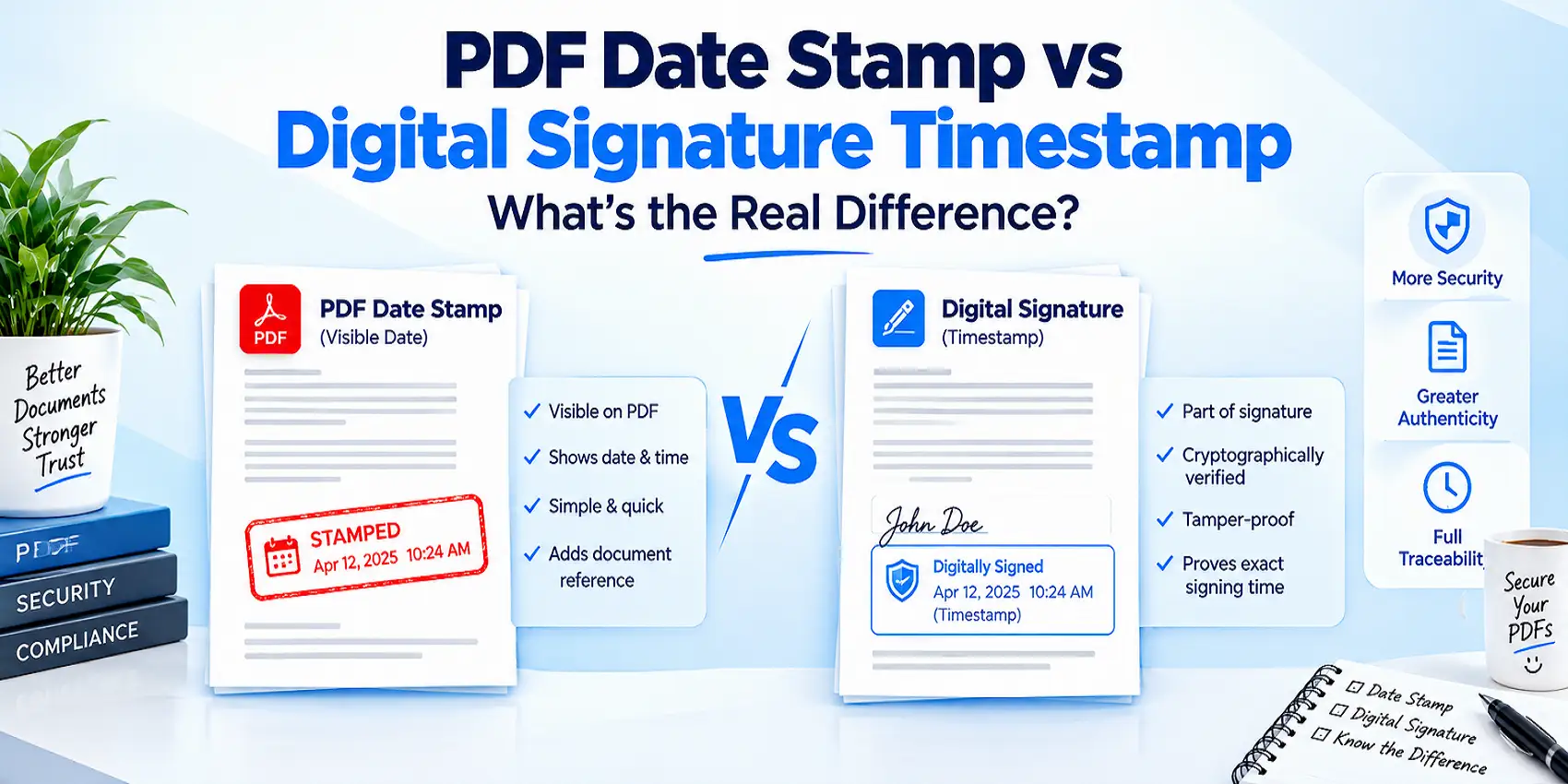
A PDF date stamp usually refers to the creation and modification dates stored in a file's metadata, or a visible stamp image (like "Received on 05/12/2026") placed on the page. Both are useful for organizing files. Neither one proves anything in a legal sense.
Here's the catch: PDF metadata sits in the document's Info dictionary or XMP data, and it can be edited with basic tools. Forensic discussions confirm this openly. One well-documented case on a forensics forum described a PDF whose creation date metadata read 2008, even though the file was actually created in 2013, showing just how easy it is for these fields to get altered, accidentally or on purpose.
So when someone hands you a PDF and says "look, the date proves it," ask yourself: proves it to whom? A metadata date is a note, not a promise.
Visible Date Stamps on PDFs
Businesses also add visible stamps for approvals, invoices, and receiving records. Think "PAID," "APPROVED," or a company seal with a date. These are great for internal workflow tracking. You can add one in seconds using a PDF stamp tool, and if you want a branded version for your company, this guide on adding a custom company stamp to a PDF walks through it step by step.
But again: a visible stamp is cosmetic. It tells a human "this happened," but it doesn't cryptographically lock anything in place.
What Is a Digital Signature Timestamp?
A digital signature timestamp is a completely different beast. It's built on math, not memory. When you digitally sign a PDF, your software creates a cryptographic hash of the document and encrypts it with your private key. That proves the file hasn't changed and that you hold the signing certificate.
What it does not prove, on its own, is exactly when the signing happened. That's where trusted timestamping comes in.
A Time-Stamping Authority (TSA), following the RFC 3161 standard set by the Internet Engineering Task Force, receives only a hash of your signature (never your actual document) and returns a timestamp token signed with its own certificate. That token becomes locked into the PDF, and no reasonable amount of tinkering can quietly change it later.
Adobe's own documentation confirms this purpose directly: trusted timestamps "help verify when the document was signed and prevent invalidation," and they support long-term validation even after a signing certificate expires.
PDF Date Stamp vs Digital Signature Timestamp: Key Differences
Feature | PDF Date Stamp | Digital Signature Timestamp |
Source of the date | File metadata or a visible image | Independent Time-Stamping Authority (TSA) |
Can it be edited? | Yes, with common PDF tools | No, without breaking the cryptographic seal |
Legal weight | Low to none | Recognized under eIDAS and PAdES standards |
Standard behind it | None (informal) | RFC 3161, ETSI PAdES |
Proves document integrity? | No | Yes |
Survives certificate expiry? | Not applicable | Yes, with long-term validation (LTV) |
Typical use case | Internal tracking, invoices, approvals | Contracts, legal filings, compliance records |
Read that table twice if you have to. It's the entire article in one glance, and it's the part most guides online gloss over.
How a Trusted Timestamp Actually Gets Created
Here's the process behind a real, tamper-evident timestamp, broken into simple steps:
You sign the PDF. Your software calculates a hash of the document and signs it with your certificate's private key.
A hash of the signature is sent to a TSA. Not the document itself, just a small fingerprint of it.
The TSA timestamps that hash. It attaches the current, trusted time and signs the whole thing with its own certificate.
The token gets embedded in the PDF. From this point, anyone validating the file later can confirm the exact signing time, even years down the road.
Long-term validation (LTV) can be added. This keeps the signature verifiable even if the original certificate later expires or is revoked.
Once you understand this chain, it becomes obvious why a metadata date and a cryptographic timestamp aren't playing in the same league.
Why This Difference Actually Matters
Contracts, court filings, tax documents, and compliance records all depend on proving when something happened, not just claiming it. A PDF metadata date can be waved away in seconds during any serious dispute. A properly applied RFC 3161 timestamp is a different story entirely, because breaking it means breaking cryptography, not just clicking "edit properties."
This matters even more in regulated industries. Under eIDAS in the EU and similar frameworks elsewhere, qualified timestamps carry real legal standing. A sticky note with a date does not.
If your documents need to hold up later, whether that's five months or fifteen years, you want the version that math can back up.
Which One Should You Actually Use?
Honestly, you probably need both, just for different jobs.
Use a visible date stamp or approval stamp when: you're tracking internal workflow, marking invoices as paid, logging when a form was received, or organizing files for your own team.
Use a cryptographic digital signature with a trusted timestamp when: you're signing contracts, submitting compliance paperwork, filing anything with legal weight, or sending documents that might need to be verified years from now.
If you're setting up proper signing for the first time, a digital ID and signature tool gets you started, and you can confirm a signature's authenticity anytime using a signature validation tool. For documents that need to stay verifiable long term, converting them to the archival PDF/A format is a smart extra step.
Common Mistakes Businesses Make With PDF Dates
A lot of these mix-ups happen quietly, and nobody notices until there's a problem:
Assuming the "Date Created" field in a PDF's properties is legally reliable.
Treating a visible "Signed on" stamp as equal to an actual digital signature.
Skipping the timestamp step entirely when signing a contract, leaving it open to certificate-expiry disputes later.
Forgetting to lock down the file afterward with a PDF protection tool, which limits who can quietly re-edit a document post-signing.
Assuming a metadata date will hold up in an audit, when auditors specifically look for signature and timestamp validation instead.
Fix these habits early, and you avoid the awkward call where someone asks "can you prove this was signed on that date?" and the honest answer is "not really."
Final Thoughts
A PDF date stamp is a convenience feature. A digital signature timestamp is a legal and technical safeguard. One is a note on a sticky pad, and the other is a signed receipt from an authority nobody can quietly argue with later.
If your documents just need internal organization, a stamp does the job fine, and tools like stamp a PDF cover that in minutes. But the moment money, legal standing, or long-term proof enters the picture, lean on a proper digital signature backed by a trusted RFC 3161 timestamp. Your future self, and possibly your lawyer, will thank you.
FAQs
Frequently asked questions
No. It's stored metadata that standard PDF editors can change, so it holds little to no evidentiary weight on its own.