
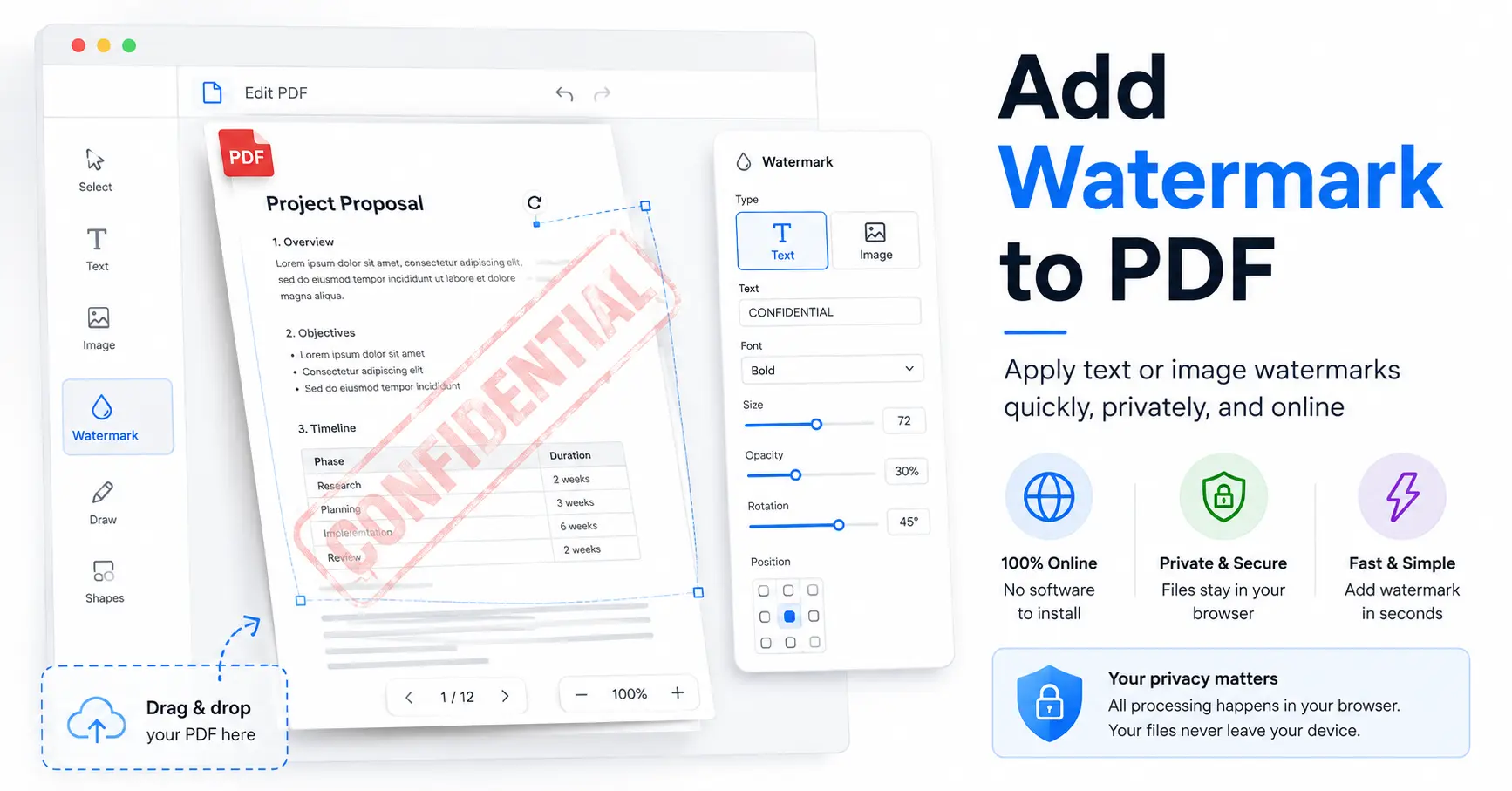
How to Add Watermark to PDF: A Complete Guide for Beginners
PDF files are one of the most common ways to share documents. People use them for business reports, school work, invoices, legal files, ebooks, and many other types of content. But sometimes, you need to protect your PDF or show its status before sharing it.
A watermark is a simple solution. It can show ownership, mark a document as a draft, or prevent confusion about a file’s purpose. For example, a company may add a “Confidential” label to an internal report, while a writer may add a name or brand mark to a document before sending it online.
If you are searching for how to add a watermark to a PDF, this guide explains the process in a simple way. You will learn different methods, common uses, and how an online tool like GoDocLab can help you add a watermark without installing software.
What Is a PDF Watermark?
A PDF watermark is text or an image placed on a PDF page to provide extra information about the document. The watermark usually appears in the background or across the page.
Common examples include:
Draft
Confidential
Sample
Company name
Copyright notice
Personal name
Watermarks do not change the main content of a PDF. Instead, they add an extra layer of information that helps readers identify the document.
For example, if you send a report that is still being edited, adding a “Draft” watermark tells people that the file is not the final version. This small label can prevent a lot of confusion.
Why Should You Add a Watermark to a PDF?
There are many reasons people add watermarks to PDF documents. The purpose depends on the type of file and how it will be shared.
Protect Document Ownership
If you create a PDF, adding your name, company name, or copyright notice can help show ownership. This does not fully stop copying, but it makes the source of the document clear.
Mark Document Status
Many teams work on documents before they become final. A watermark helps people quickly know whether a file is complete or still being reviewed.
For example:
Draft documents can have a “Draft” label.
Private files can have a “Confidential” label.
Sample files can have a “Preview” label.
Improve Brand Recognition
Businesses often add their brand name to reports, guides, and presentations. This helps readers know where the document came from.
Prevent Mistakes
A clear watermark can reduce mistakes. Nobody wants to accidentally send an unfinished document to a client. A simple “Not Final” watermark can save time and avoid awkward situations.
How Do You Add a Watermark to a PDF?
Many people search how do you add a watermark to a PDF because they want a quick and simple method. The process is easier than many users expect.
You can add a watermark using online tools, desktop software, or coding methods.
For most users, an online PDF tool is the fastest choice because it does not require installation.
How to Add Watermark to PDF Online
An online tool allows you to upload your PDF, add your watermark, and download the updated file.
Here is the basic process:
Open a trusted online PDF watermark tool.
Upload your PDF file.
Enter the watermark text.
Adjust the watermark position if available.
Apply the watermark.
Download your new PDF file.
GoDocLab provides a free online way to add watermarks to PDF files. Users can complete the task directly from their browser without installing any program.
This makes it useful for students, professionals, businesses, and anyone who needs a quick PDF update.
How to Add Draft Watermark to PDF
A draft watermark is one of the most common types of PDF watermarks.
When a document is still being edited, a draft label tells readers that changes may happen later. This is useful for reports, contracts, proposals, and internal documents.
If you need to add draft watermark to pdf, follow the same basic steps:
Upload your PDF file.
Choose a text watermark.
Enter “Draft”.
Place it where you want.
Save the updated file.
A draft watermark may look simple, but it can prevent major communication problems. It is like putting a sticky note on a printed page, but much cleaner.
How to Add Watermark in PDF Using Online Tools
Online PDF tools are popular because they save time. You do not need special technical skills or expensive software.
When choosing a tool, check these points:
Does it support PDF files?
Is it easy to use?
Does it work in your browser?
Does it protect your uploaded files?
Does it provide clear results?
GoDocLab offers a simple online solution for users who want to add watermarks without downloading applications.
How to Add Watermark on a PDF Document
The steps for adding a watermark are similar for most PDF files.
If you want to add watermark to a PDF document, start by deciding what type of watermark you need.
Common choices include:
Text Watermark
A text watermark uses words such as:
Confidential
Draft
Company Name
Copyright
This is the easiest option for most users.
Image Watermark
Some tools also support image-based watermarks, such as logos. However, availability depends on the software or online service you use.
Before selecting a tool, check whether it supports the type of watermark you need.
How to Add Watermark on PDF Without Software
Many people do not want to install extra programs just for one small task. Online tools solve this problem.
To learn how to add a watermark on PDF without software, follow these steps:
Visit an online PDF watermark service.
Select your PDF file.
Add your watermark details.
Create the updated PDF.
Save the final document.
This method works well for occasional users who need a fast solution.
Adding Watermarks Using Programming Methods
Developers may need to add watermarks automatically to many PDF files. In that case, programming libraries can help.
For example, developers often search for c# add watermark to pdf when building applications that handle PDF documents.
Programming methods are useful for businesses that need automatic document processing. However, they require coding knowledge and are usually unnecessary for normal users.
For a single PDF file, an online tool is usually much easier.
Online Tool vs Manual PDF Software
There are different ways to add watermarks. Each method has its own benefits.
For most people, an online tool provides the best balance between speed and simplicity.
Why Use GoDocLab to Add Watermarks?
GoDocLab helps users complete PDF tasks directly from a browser. It is free to use and does not require software installation.
This makes it a practical choice for people who need to add a watermark quickly.
Benefits include:
No installation needed
Simple online process
Free access
Works from a browser
Suitable for personal and professional documents
If you regularly work with PDFs, having a simple online tool can save time.
You can visit GoDocLab and try the PDF watermark feature whenever you need to update a document.
Common Mistakes to Avoid When Adding Watermarks
Adding a watermark is simple, but some mistakes can reduce the quality of your document.
Making the Watermark Too Large
A watermark should not cover important text. Readers should still be able to read the document easily.
Using Hard-to-Read Colors
A watermark should be visible but not distracting. A strong contrast can make the document uncomfortable to read.
Forgetting to Check the Final PDF
Always open the final file before sharing it. Check every page and make sure the watermark appears correctly.
Adding Unnecessary Watermarks
Not every document needs a watermark. Use one when it adds value, protects information, or explains document status.
Frequently Asked Questions
How to add watermark to a PDF?
You can add a watermark by using an online PDF watermark tool. Upload your file, enter your watermark text, apply the changes, and download the updated PDF.
How to add watermark pdf files without installing software?
Use an online PDF tool like GoDocLab. You can complete the process directly in your browser.
How to add watermark to a PDF document for free?
Free online PDF tools allow users to add watermarks without paying for expensive software.
How to add draft watermark in PDF?
Upload your PDF, choose a text watermark, type “Draft,” and apply it to your document.
Final Thoughts
Adding a watermark to a PDF is a simple way to label, protect, and organize documents. Whether you need to mark a file as a draft, show ownership, or add a professional touch, a watermark can help.
The best method depends on your needs. Developers may choose coding solutions, while regular users can use online tools for faster results.
For a simple and free option, GoDocLab allows you to add watermarks to PDF files online without installing software. Try it when you need a quick way to update your documents and keep them clear for your readers.